Overview
Dover’s Slack integration posts candidate updates from Dover into your company’s Slack channels. It’s for hiring teams that already talk about candidates in Slack, and it’s included in both the Free and Premium plans.
Hiring managers and interviewers don’t keep Dover open all day. They ask in a channel whether a candidate passed the screen or if feedback is in, and a recruiter stops to look it up. When several jobs are open, those small questions arrive constantly, and the answer is soon out of date. Dover can now post the news in the channel where people would ask. Nothing about the candidate changes: people still review and decide in Dover.
What the Slack integration does
Dover can post when:
- A candidate enters a stage.
- A candidate is rejected.
- An interview is scheduled.
- An interview is starting.
- A feedback form is submitted.
The last three apply to interview stages. Updates link to the candidate in Dover, so a reviewer can go from the message to the profile. When Dover has a LinkedIn profile for the candidate, updates that carry the Dover link include that too.
How Slack channels are chosen
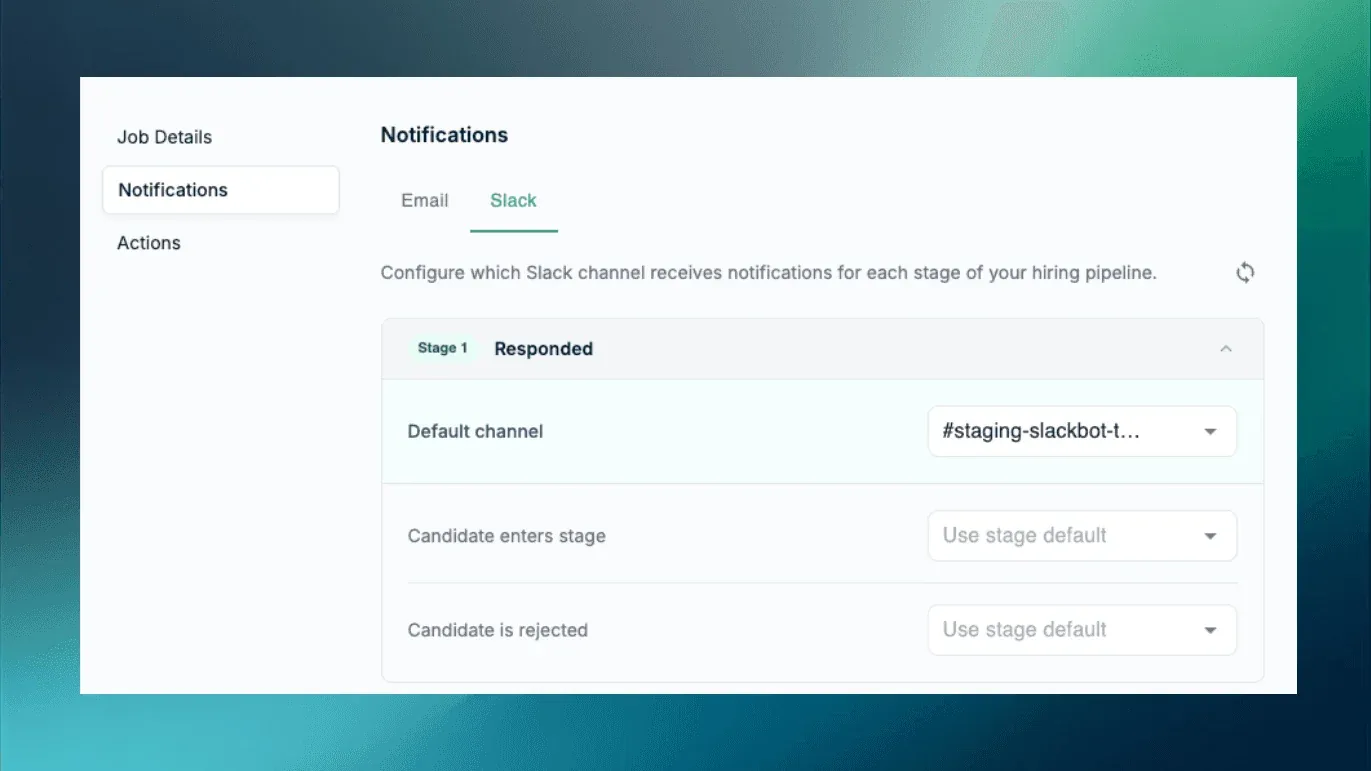
Open a job’s notification settings and pick a Default channel for each stage. A final round can post to a small private group while early stages go to the wider hiring channel. Each job has its own choices, so a busy engineering role doesn’t fill the sales channel.
If one kind of update belongs elsewhere, choose another channel for it. Otherwise leave it on Use stage default.
Set up the Slack integration
- Open Settings → Integrations and click Slack.
- Click Connect Slack and approve Dover.
- Click a job in the list that appears and choose its channels.
Start with one active job and the Candidate enters stage update, then add more once the team finds it useful. Full steps and screenshots are in the help article.
Slack integration availability and pricing
The Slack integration is included in Free and Premium. Connecting the workspace needs the Integrations company permission. One workspace is connected for the company, and channels are set job by job. See plans and pricing.
Frequently asked questions
Is the Dover Slack integration free?
Yes, it's included in both Free and Premium.
Do I have to choose Slack channels for every job in Dover?
Yes. You connect Slack once for the company, then choose channels on each job's Slack tab.
Do Dover Slack updates replace email notifications?
No. Email has its own tab in each job's notification settings, and the two are controlled separately.