Overview
Dover’s Require a Dover account to apply setting asks applicants to sign in with a verified email address before they can fill in your application form. It’s part of the Enterprise plan, for teams with jobs that attract a lot of fake or automated applications.
Open application forms are easy to submit in bulk. When a posting attracts bots and invented applicants, your team spends its review time sorting out who is real, and genuine candidates wait longer for an answer. Checking each one by hand does not stop the next batch from arriving.
What requiring a Dover account to apply does
- Adds one step before the form. Applicants verify an email address before anything reaches your Applicants tab.
- Keeps the posting public. Anyone can still read the job description.
- Fills in a locked email. A signed-in applicant’s email comes from their account and can’t be changed.
- Lets you choose the jobs. The setting is per job, so you can use it on a job with a spam problem and leave the others open.
You still decide who to advance or reject.
How requiring a Dover account to apply works
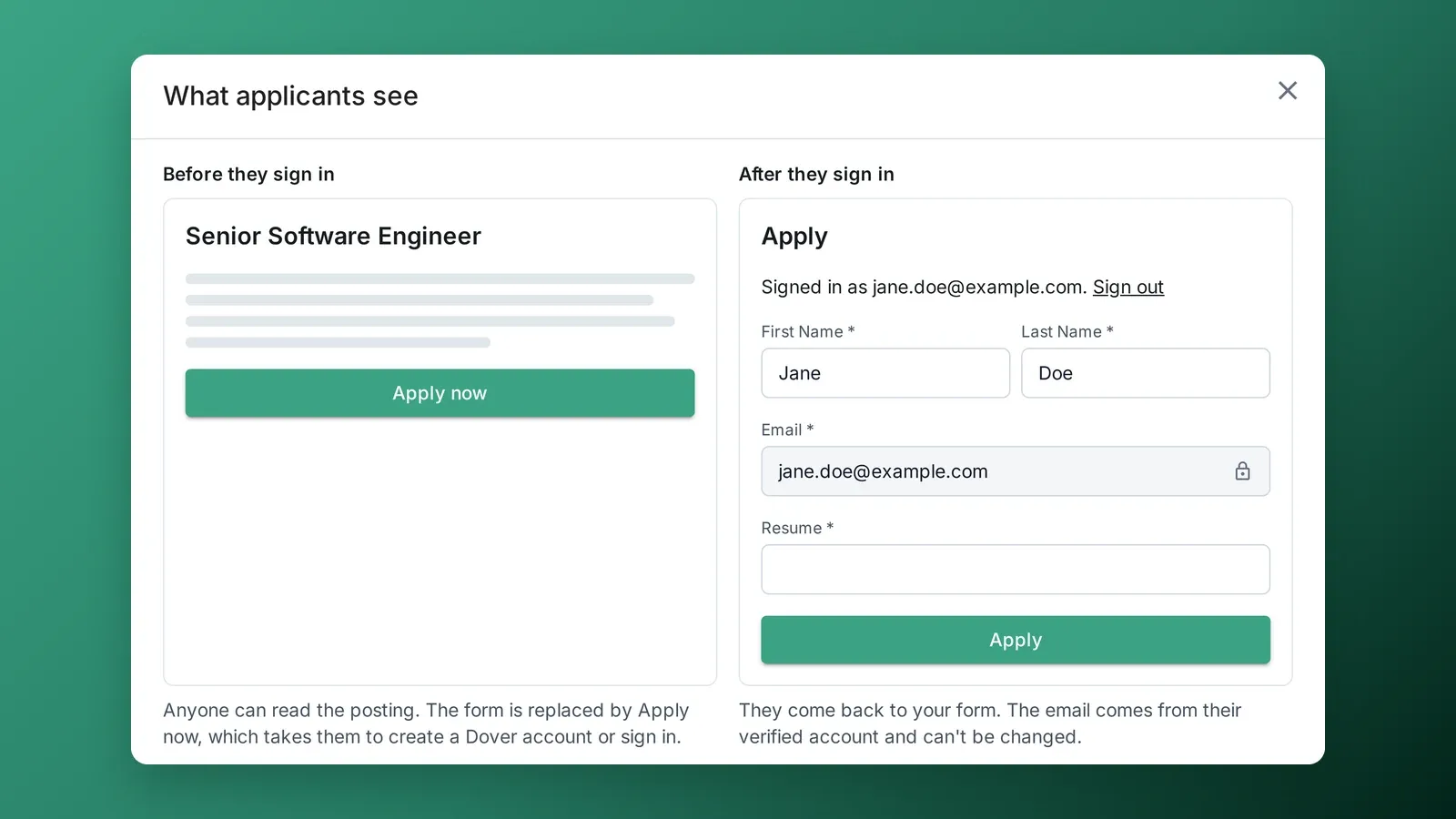
With the setting on, a signed-out applicant sees an Apply now button in place of the form. It takes them to create a Dover account, or sign in if they already have one, and then back to your job.
A signed-in applicant sees your normal form. If your application form is inside a page on your own website, Apply now opens the posting in a new tab. After they apply, they can track the application from their Dover account.
The setting is off by default. Requiring an account can also lower your total number of applicants, so weigh that for roles that are hard to fill.
Set up requiring a Dover account to apply
Anyone with the Edit job permission can turn it on.
- Open a job and click Job Posting.
- Open Customizations. Under the Require a Dover account to apply switch, click Preview what applicants see to check the form before and after sign-in.
- Turn on Require a Dover account to apply, then click Save.
Start with the one job that gets the most fake applications, and compare its applicants with your open jobs before you use it more widely. Full steps and screenshots are in the help article.
Require a Dover account to apply availability and pricing
The setting is part of Enterprise. Free and Premium don’t include it.
It applies to the application form that Dover hosts. Candidates you add yourself, bulk uploads, and applications from the API or a partner are not affected.
If your plan stops including the setting, your jobs go back to open applications. The switch stays as you left it, so the requirement returns if you upgrade again. You can turn it off at any time. See plans and pricing.
Frequently asked questions
Is the Dover require an account to apply setting free?
No. It is an Enterprise setting. On Free and Premium, anyone can apply without signing in.
Can candidates still read a Dover job posting without an account?
Yes. The posting stays public. Only the application form is replaced by an Apply now button until the applicant signs in.
Does requiring a Dover account affect candidates I add or who come through a partner?
No. Candidates you add yourself, bulk uploads, and applications that arrive through the API or a partner work as before.