Overview
Dover’s Compare shows the interview feedback for two to five candidates next to each other. It’s included in ATS Premium, for hiring teams choosing between people in the same stage. Choosing between finalists usually means a lot of open tabs: you read one person’s feedback, then the next, and try to remember how the first one did on the same question, so the person you read last tends to stand out.
What Compare does
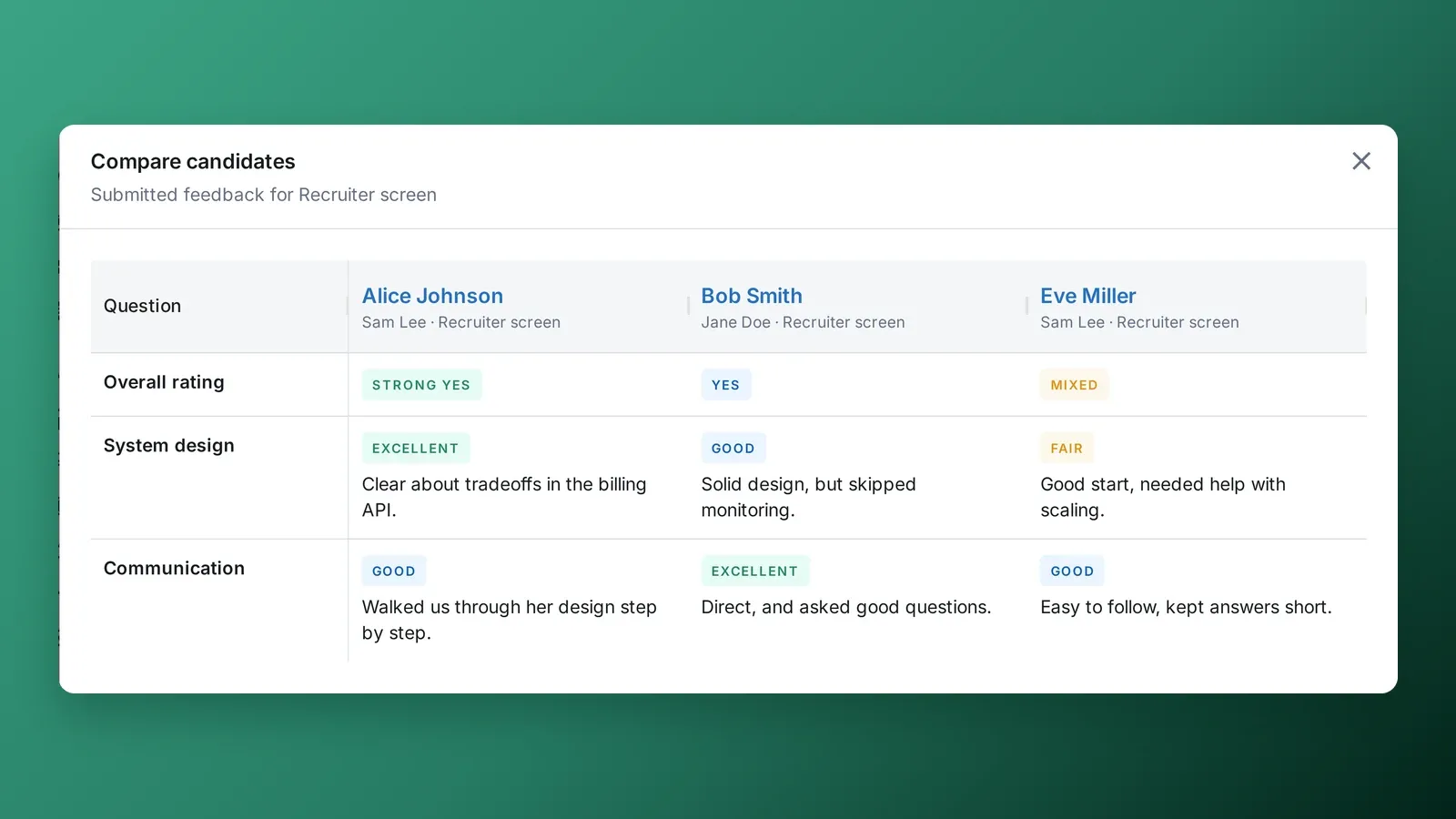
- Reads answers question by question. Each candidate is a column and each question is a row. Overall rating comes first, followed by every question that someone answered. A cell has the score, if the question has one, with the written notes under it.
- Brings together several interviewers and forms. When several people interviewed the same candidate in a stage, each answer shows whose feedback it came from. Dover matches questions that have the same wording, so “Communication” on two forms appears as one row, and when more than one form was used, each entry says which form it came from.
- Opens a candidate for the full story. Click a name at the top of a column to open that candidate’s profile in a new tab, with their resume, notes and activity. The comparison stays open.
Compare only shows what your interviewers wrote. It doesn’t rank anyone, and the decision stays with your team.
How Compare works
A dash means there is no answer. If nobody has submitted feedback for a candidate, the column says “No feedback submitted yet”, so a gap isn’t mistaken for a low score.
Compare follows the feedback permissions you already have. If you can’t view some of a candidate’s feedback, their column says how many more forms there are, but not what’s in them. Two people who compare the same candidates may therefore see different answers.
Set up Compare
- Open a job and click Candidates.
- Check two to five people in one interview stage. Select them one by one, since Compare may be turned off when you select a whole stage.
- Click Actions and choose Compare.
Try it first in your next debrief, and go through one question at a time. Full steps and screenshots are in the help article.
Compare availability and pricing
Compare is included in ATS Premium. You can compare two to five candidates at a time, and they must be in the same interview stage of one job. It covers submitted feedback for that stage, and leaves out other stages. See plans and pricing.
Frequently asked questions
Is Dover's Compare feature free?
No. Comparing candidates is part of ATS Premium.
How do I compare candidates in Dover?
On a job's Candidates tab, select two to five candidates in the same interview stage, click Actions, and choose Compare.
Does Dover's Compare rank candidates?
No. It shows the feedback your interviewers submitted. It doesn't score, rank or recommend anyone.
What if interviewers used different feedback forms in Dover?
Questions with the same wording share a row. When more than one form was used, Dover names the form next to the feedback.