Overview
Dover’s candidate reviews ask the people you interview to rate the experience, and show you what they said. They’re included in the Free and Premium plans, and Premium adds ways to respond.
Most candidates never tell you how an interview went. You hear about a confusing round or a slow reply only when someone withdraws, or not at all. Meanwhile people who are deciding whether to apply have little to go on.
What candidate reviews do
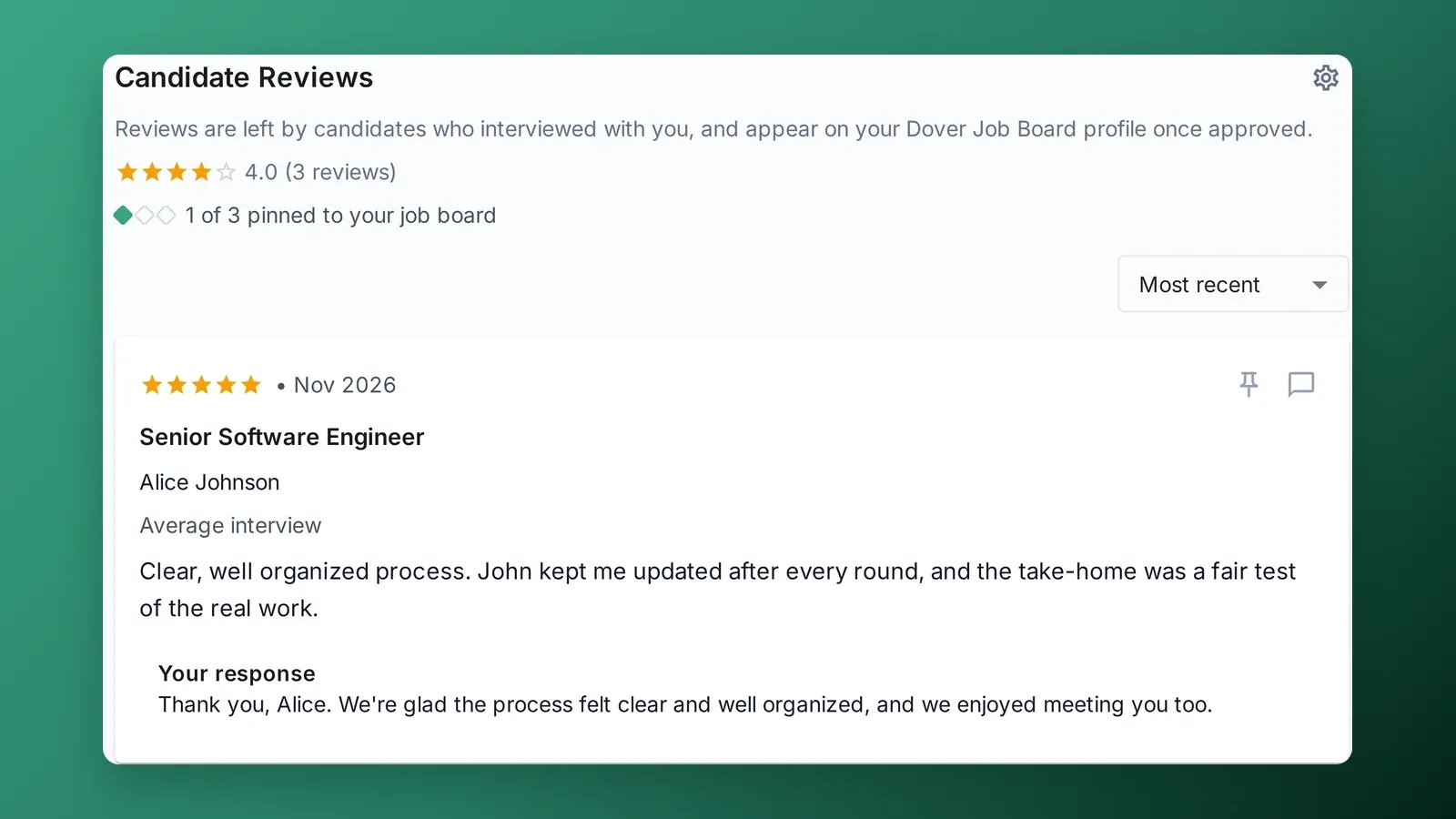
- Ask every candidate automatically. Nobody on your team has to build a survey or send it. Candidates can give an overall rating from one to five stars, how difficult the interviews were, from very easy to very difficult, and a written review.
- Collect the answers on one page. Candidate Reviews in the left sidebar shows your average rating, then each review with its rating, the job, the interview difficulty and the text. When there is more than one review, you can sort the list.
- Show reviews on Dover Startup Jobs. Job seekers can read them on your Dover Startup Jobs profile.
- Let you respond. Respond to this review adds your answer below what the candidate wrote, and you can edit it later. Pin to your job board features a review at the top of your profile. You can pin up to three.
The words are the candidate’s, and you choose how to respond.
How candidate reviews work
Dover emails candidates 10 days after they reach an interview stage, and asks only once per candidate. A review that was hidden shows a Hidden tag and stays off your public profile.
If a marketplace recruiter works on the job, they can reply to its reviews too. Their reply is shown next to yours, under their own name.
Set up candidate reviews
Request emails are on by default for each job.
- Open Candidate Reviews and click the settings icon to see which active jobs send the email, each marked On or Off.
- Click a job to open the Candidate Review Request toggle in its Job Posting tab.
A good first step is to check that the jobs you’re interviewing for now are on. Full steps and screenshots are in the help article.
Candidate reviews availability and pricing
On the Free plan, candidates get the request emails, and you can read every review without the reviewer’s name. ATS Premium adds replies, pinning, the names of reviewers, and the option to stop the emails for a job. See plans and pricing.
Frequently asked questions
Is the Dover candidate reviews feature free?
Yes, with limits. Free companies get the request emails and can read their reviews. Replies, pinning, reviewer names and turning off the emails need ATS Premium.
How do I turn on Dover candidate reviews?
They're on by default for each job. The Candidate Review Request toggle is in Customizations on the job's Job Posting tab.
Are Dover candidate reviews anonymous?
On the Free plan, reviews show Anonymous candidate. With ATS Premium, you can see in Dover who left a review.
How many Dover candidate reviews can I pin?
Up to three. Pinned reviews show first on your Dover Startup Jobs profile.