Overview
Dover’s careers page customization lets you set the font and colors of your careers page, so it looks like part of your own website. It’s included in ATS Premium and needs no code. Candidates often reach your careers page straight from your site, and when the type and colors change on the way, it can feel like they’ve landed somewhere else.
What careers page fonts and colors change
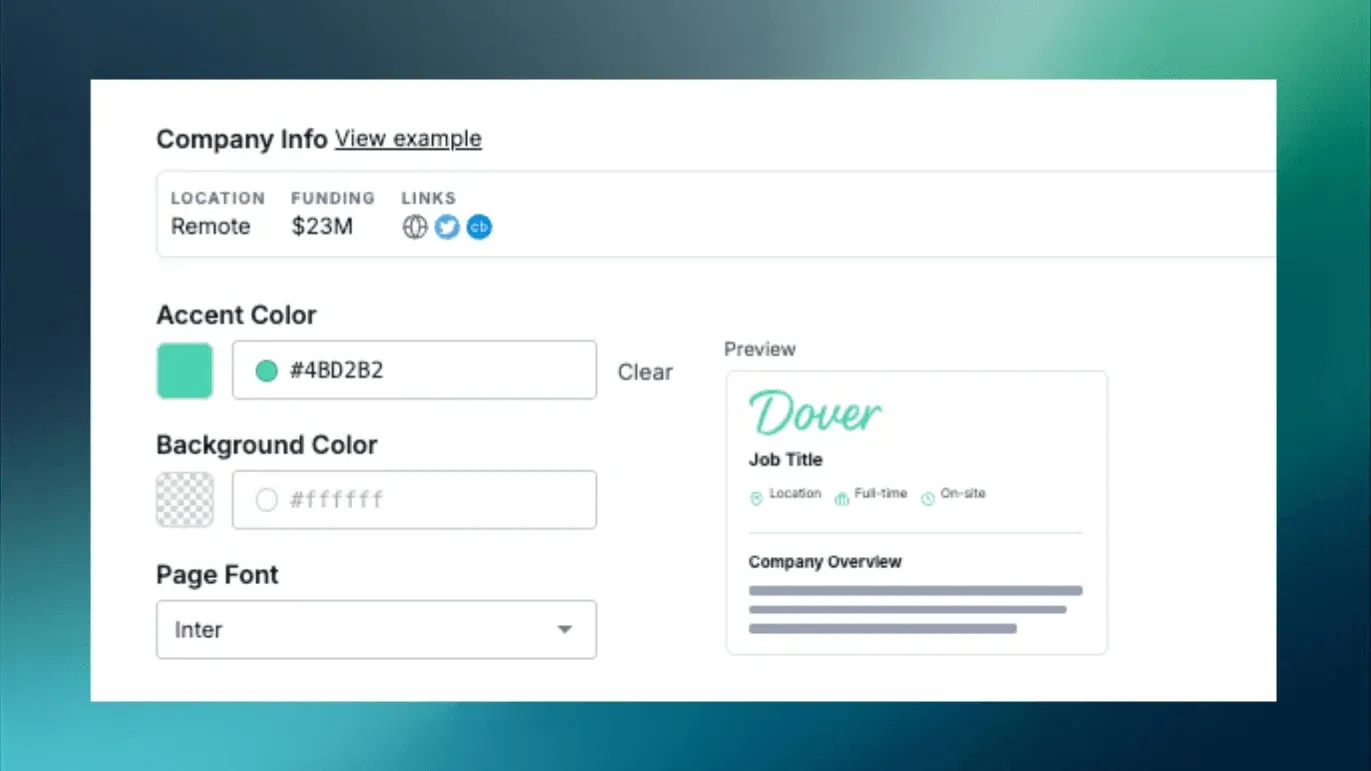
- Page font offers 20 options: web fonts such as Inter, Open Sans and Playfair Display, plus common system fonts. Click Reset to go back to the font you had before you started editing.
- Accent color sets the highlight color, and Background color sits behind the page. Pick a color or type its
hex code, such as
#1F6FEB.
Both colors also apply to the application form, so the look continues after a candidate clicks a job. Nothing changes for candidates until you save.
Set up careers page fonts and colors
- Click Careers Page in the left sidebar.
- On the Page tab, open the Style panel and find Colors & font.
- Choose a Page font, an Accent color and a Background color, then click Save.
Start with the accent color from your website and check the preview before you save. Full steps and screenshots are in the help article.
Careers page fonts and colors availability and pricing
Included in ATS Premium, $199/month, and in Enterprise. On Free you can preview a change, and saving it opens the upgrade window. See plans and pricing.
Frequently asked questions
Can I change Dover careers page fonts and colors on Free?
You can try them in the preview, but saving a font or color change needs ATS Premium. Your logo and its size are available on every plan.
Can I use my own font on my Dover careers page?
No, you choose from the list in Page font. It has 20 options, including Inter, Roboto, Montserrat, Poppins, Merriweather and your visitor's system font.