Overview
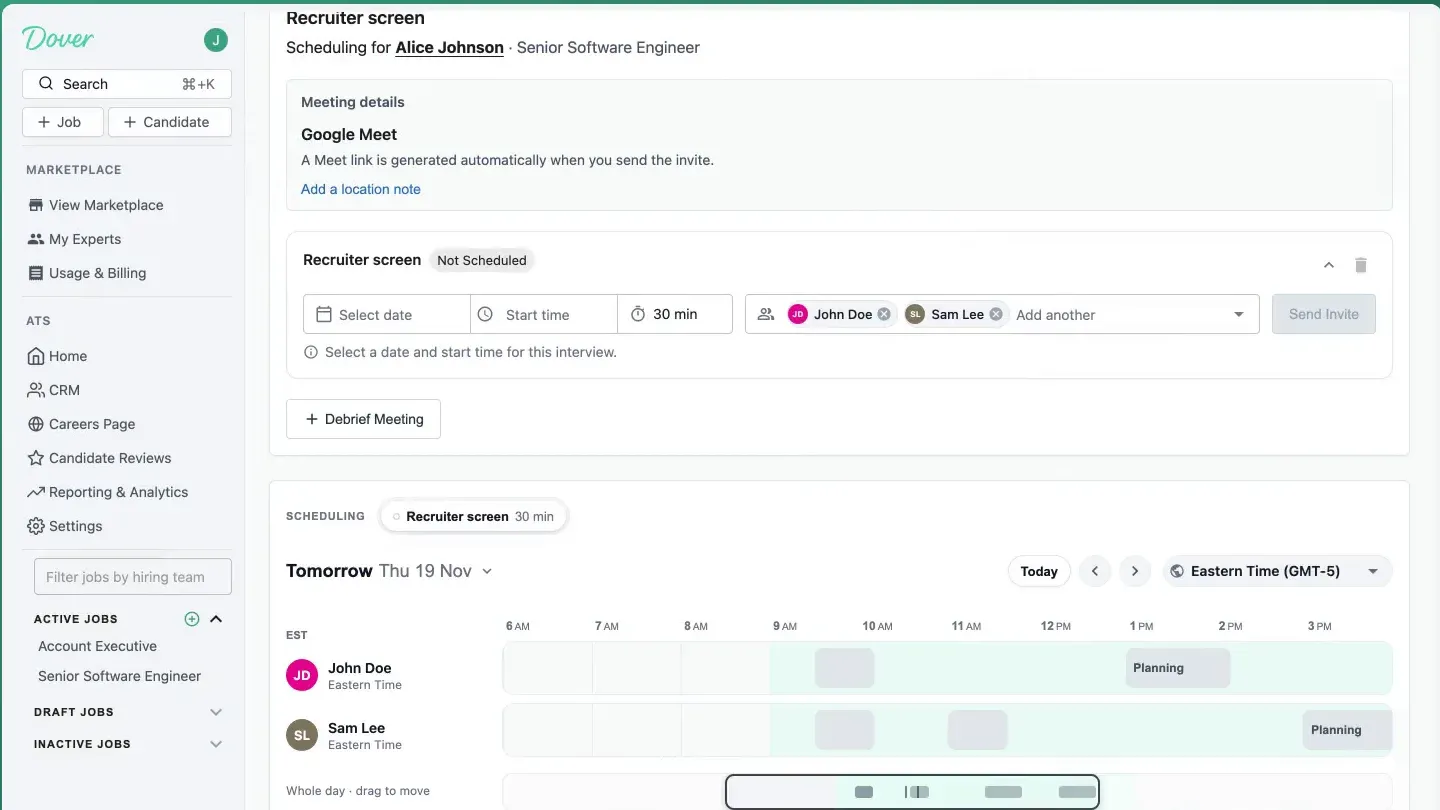
Dover’s interview scheduler now shows each interviewer’s day as a row on one timeline, with start times that suit everyone. It’s for recruiters on the Premium or Enterprise plan who place interviews on calendars themselves. Side-by-side calendars show you what’s taken, but finding a gap still means reading down each column, and a third interviewer or another timezone makes it slower.
What the scheduler timeline does
- Choose a time from the timeline. Point at the timeline to check a time, then click to set it. Times snap to 15 minutes, and Dover tells you when a choice conflicts with someone’s day or has passed.
- Use a suggested time. Up to six times appear next to Everyone’s free, half an hour or more apart. They follow interviewers’ availability hours when they can. If no time fits those hours, Dover looks at the rest of the working day for times when nobody is busy.
- Schedule several rounds in one place. Tabs above the timeline show which round you’re scheduling. Rounds you’ve already placed are marked, so you can avoid booking one person twice. Drag the Whole day strip to move to other hours.
Set up the scheduler timeline
- Open a candidate in an interview stage and click Schedule Interview.
- Scroll to the timeline and pick a suggested time.
- Check the date above it, then click Send Invite.
Full steps and screenshots are in the help article.
Scheduler timeline availability and pricing
Sending invites from the scheduler is part of ATS Premium at $199/month, and of Enterprise. Dover can only show busy times for calendars it can read, and warns you about one it can’t. See plans and pricing.
Frequently asked questions
Is the Dover scheduler timeline free?
Sending an invite from the scheduler needs ATS Premium ($199/month) or Enterprise.
How do I use the Dover scheduler timeline?
Open a candidate's profile and click Schedule Interview. The timeline is below the interview details, with nothing to turn on.
Can I choose a time when someone is busy on the Dover scheduler timeline?
The timeline warns you and names who already has something at that time. You choose whether to keep it.